
Select the correct answer:
2. Container element has both
14. The text between <title> and </title> will be displayed
1. Write a program in HTML to display the following :
My first program ---------------------------- 1
I am in class 7 -----------------------------2
Bishop Cotton Boys' School -----------------------------3
<html>
<head>
<title> Example 1</title>
</head>
<body >
<b> My first program</b> <br>
I am in <I> class 7 </I> <p>
<u> Bishop Cotton Boys' School</p>
</body>
</html>
The line1 is darker than the rest of the program. This is because of the bold tag. to go to the next line use the <br> tag.
In line 2 , only class 7 is slanting , so use italics tag for that.
There is a blank line between line 2 and line 3, so paragraph tag should be used. Even if you close <p> before <u> tag also will give same effect.
In line 3,a line is drawn below the whole sentence using <u> tag.
2. What would be the output for the following program:
<html>
<head>
<title> Example 2</title>
</head>
<body bgcolor=olive > ------------------1
<font color=white size=6 face= Mistral> ------------------2
Computers<br>Class 7
<p>
Cottonnian shield...................
</p>
<!- I am going to draw a line - > -----------------3
<hr size=5 > -----------------4
</font>
</body>
</html>
Line 1 : the background colour. The spelling is bgcolor.
Line 2 : font color makes the text and numbers to turn to that particular colour. face changes the default font name to the name given.
Line 3 : This is the comment line , which will not be displayed in the web browser.
Line 4: The horizontal line with size 5

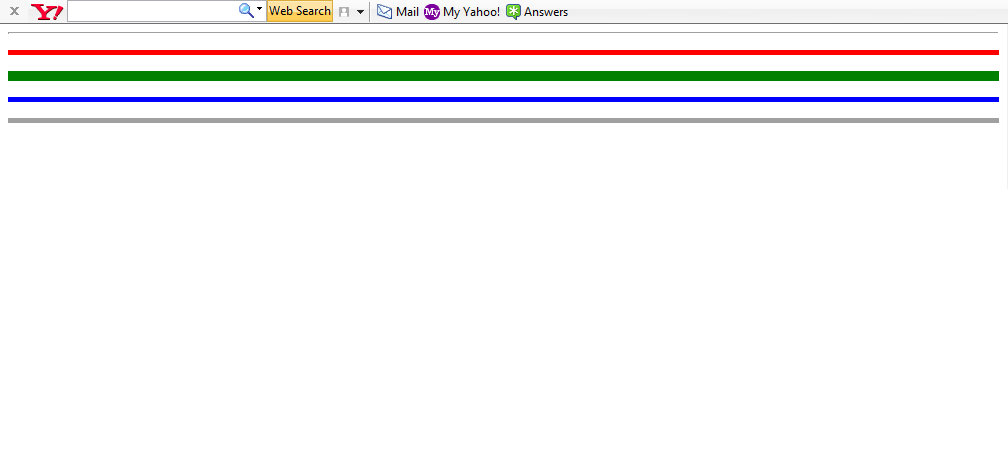
The above output has 5 lines. The first one is a thin line, because there is no size tag.
<html>
<head>
<title> Example 3</title>
</head>
<body>
<hr > <p>
<hr size=3 color=red> <p>
<hr size=8 color=green></p>
<hr size=3 align=right color=blue><p>
<hr size=3 noshade ></p>
</body>
</html>
- HTML stands for
- Hyper Text Markup Language
- Hyper Text Makeup Language
2. Container element has both
- opening and middle tag
- opening and closing tag
- a line break tag
- an empty tag
- line break and an empty tag
- an editor
- a web browser
- search engine
- <body backcolor=red>
- <body bgcolour=red>
- <body bgcolor=red>
- <body backcolour=red>
- <body bg color=red>
- <text=green>
- <body textcolour=green>
- <body text=green>
- <textcolour=green>
- moves the cursor to the next line
- leaves a blank line
- leaves a paragraph
- comments
- title
- body
- <align=center>
- <align=centre>
- <p align=centre>
- <center>
- 1 to 7
- 1 to 6
- 1 to 3
- <dark>
- <b>
- <bold>
- <u>
- <line>
- <strike>
- <strikethrough>
- <head>
- <h1>
- <h6>
14. The text between <title> and </title> will be displayed
- in the title bar
- in the heading bar
- in the web page
- none of the above
- an additional information about the tag
- main tag
- an example
1. Write a program in HTML to display the following :
My first program ---------------------------- 1
I am in class 7 -----------------------------2
Bishop Cotton Boys' School -----------------------------3
<html>
<head>
<title> Example 1</title>
</head>
<body >
<b> My first program</b> <br>
I am in <I> class 7 </I> <p>
<u> Bishop Cotton Boys' School</p>
</body>
</html>
The line1 is darker than the rest of the program. This is because of the bold tag. to go to the next line use the <br> tag.
In line 2 , only class 7 is slanting , so use italics tag for that.
There is a blank line between line 2 and line 3, so paragraph tag should be used. Even if you close <p> before <u> tag also will give same effect.
In line 3,a line is drawn below the whole sentence using <u> tag.
2. What would be the output for the following program:
<html>
<head>
<title> Example 2</title>
</head>
<body bgcolor=olive > ------------------1
<font color=white size=6 face= Mistral> ------------------2
Computers<br>Class 7
<p>
Cottonnian shield...................
</p>
<!- I am going to draw a line - > -----------------3
<hr size=5 > -----------------4
</font>
</body>
</html>
Line 1 : the background colour. The spelling is bgcolor.
Line 2 : font color makes the text and numbers to turn to that particular colour. face changes the default font name to the name given.
Line 3 : This is the comment line , which will not be displayed in the web browser.
Line 4: The horizontal line with size 5
The above output has 5 lines. The first one is a thin line, because there is no size tag.
<html>
<head>
<title> Example 3</title>
</head>
<body>
<hr > <p>
<hr size=3 color=red> <p>
<hr size=8 color=green></p>
<hr size=3 align=right color=blue><p>
<hr size=3 noshade ></p>
</body>
</html>


