Monday, 22 July 2013

Class 6 - Model Paper

Fill in the blanks with suitable answers:

1. ____ effects are special sound or visual effects which are added to the text or other objects such as picture.
2. ____ is a combination of hyper text and multimedia.
3. 1MB = ___ KB
4. In _________ contents can be erased with the help of electric signals.
5. The _____ memory is limited in size and temporary.
6. Inkjet printer uses ______ technology.
7. An optical mouse uses _____ instead of a rotating ball to detect movement.
8. ____ provides different types of designs, layouts, structures and colour schemes.
9. A monitor screen comprises tiny dots known as ____ that combine to form an image.
10. _____ is referred as the  brain of the  computer.
Match the following

1. QWERTY                                           a. text effect
2. Mechanical mouse                              b. soft copy
3. Scanner                                               c. Doughnut           
4. WordArt                                             d. super computer
5. Chart                                                   e. rubber ball
6. Terabyte                                              f. keyboard
                                                                g. 1024 MB
Write the full form :

1. CPU
2. pixel
3. LCD
4. TFT
5. cps
6. DDR
7. EEPROM
8. SDRAM
9. ROM
10. DVD

Differentiate the following terms :

1. Impact and non-impact printers
2. Primary memory and secondary memory
3. CRT and LCD monitors
4. Animation and transition effects

Write the keyboard short cut keys :

1. To open a print dialog box.
2. To close the presentation
3. To start a slide show
4. To insert a duplicate slide
5. To save a presentation


Sunday, 21 July 2013

Class 8 - Revision

Go through the Class 7 worksheets and revision in the blog. That will help you.
Image

<img src=filename>
<img src= bird.jpg>

Attributes of image tag :
1. width - changes the width of the image
2. height - changes the height of the image
3. border - border around the image, default value is 0.
4. alt - if the image is not available, the alternate text will be displayed.
5. align - position of the image in the web page.
align =right/left/middle/top/bottom
<html>
<body>
  <img src=moon.jpg height=400 width=400>

</body>
</html>


Hyperlink

  • External Linking
  • Internal Linking
External linking :
< a href=URL> link text </a>
a - anchor tag. Everything between <a> and </a> behaves like a link.
URL - address of the webpage to be opened.
link text - text acting as a link.
Internal  Linking :
 Linking different locations in the same document.


Thursday, 18 July 2013

Class 7 - image

<html>
<head>
<title> Worksheet 4 </title>
</head>
<body background=back1.jpg>             --------------------- 1
<font size=7 color=green>
  <p>


     <center> Class 7
   </p>
 </font>
<font size=6 color=red>
If you can't fly, then run <br>
If you can't run, then walk <br>
If you can't walk, then crawl <br>
but whatever you do,<br>
You have to keep moving forward<br>
 </center>

<p align=right>                        ------------------------- 2
- Martin Luther King Jr.
</font>
</body>
</html>


Line 1 : The background image can be inserted using this tag. back1.jpg is an image file.

Line 2 : It aligns the text to the right .


Class 7 - Worksheet 4

Heading tag:
There are 6 heading tags. <h1> is the biggest tag and <h6> is the smallest.
Since the text attribute is used to change the colour, the entire document will have the same colour. Whereas if you use <font color> then you can have different colours.
 <html>
<head>
<title> Worksheet 4 </title>
</head>
<body bgcolor=purple text=white>
<h1>This is heading 1</h1>
<h2>This is heading 2</h2>
<h3>This is heading 3</h3>
<h4>This is heading 4</h4>
<h5>This is heading 5</h5>
<h6>This is heading 6</h6>
</body>
</html>


Wednesday, 17 July 2013

Class 6 -Revision 2

CENTRAL PROCESSING UNIT (CPU)
    • Also called Microprocessor
    • Brain of the Computer
    • Speed of the Computer depends upon the Microprocessor
    • Dual core, i3, i5, i7 are the examples
    • Consists of 3 parts
   1. Arithmetic Logic Unit (ALU)
  • All mathematical Calculations, logical comparisons are done
   2. Registers
  • Small memory units
  • Stores data, instructions and results while processing
   3. Control Unit (CU)
  •  Controls the movement of  data inside and outside the CPU
  • Communicates between the Registers and the ALU
  • Communicates between the CPU and the Input-Output  storage devices.
OUTPUT DEVICES
   1. Monitor
  • The screen comprises of tiny dots known as pixels
  • Pixels combine to form an image
            Types of Monitors
             A.Cathode Ray Tube (CRT)
                 - Bulky 
                 - Needs more power
                 - Cheaper
             B. Liquid Crystal Display (LCD)
                 - Uses TFT (Thin Film Transmitter) technology
                 - Light weight and compact
                 - Needs less power
                 - Expensive
   2. Printers
        i. Impact printer                
            - It physically strikes a head or a needle against an ink 
               ribbon to make a mark on the paper. Low quality printout,
               takes more time.
             
              Line Printer - It prints single line at a time   
              Character Printer  - It prints single character at a time
                 
               Dot Matrix Printer
                  - Prints one character at a time            
                  - Speed is measured in characters per second (cps)
                  - Inexpensive
                  - Very noisy
                  - Low quality printout
                  - Print only in black
                  - Takes more time
               Daisy Wheel Printer
                  - Cannot print graphics
                  - Slow and more expensive than Dot Matrix Printer
                Drum Printers
                  - Faster than the above two printers
                  - Prints a line in a single operation
                  - Low quality printout
                  - Loud and
                  - very expensive

        ii. Non impact printer
             - These printers do not involve any contact between the
                print head and the surface. High speed and high quality.
          
               Ink Jet Printer
                  - High resolution
                  - High quality and text
                  - Sprays droplets of ink onto the paper to produce a        
                       Character
                 -Thermal heating process or the Bubble inkjet 
                        technology is used

                Laser Printer
                  - Good quality printout
                  - High speed
                  - Expensive
                          - High Maintenance Cost

   3. Plotter
  • Generates graphical outputs such as images, charts, graphs, blueprints, maps, circuit diagrams and other line-based diagrams.
  • Draws lines using a pen.
  • Used by engineers and architects.          


Class 6 - Revision

A computer is a machine which takes data and instruction from the user through the input devices, processes them in the CPU, and produces the  useful information through the output device.

Input devices

1. Keyboard :
  • Popular device.
  • has numbers, letters and special characters
  • has function keys

  • 2. Mouse
    • Mechanical Mouse
    • has a metal or rubber ball at the bottom, which rotates when the mouse is moved.
    • as the ball rotates, it moves the 3 rollers at the bottom.
    • it generates electrical signals which indicates the mouse direction
    • popular, less expensive

    • Optical Mouse
    • uses light beam instead of balls.
    • has a wheel with tiny holes
    • has light source and light sensor
    • it lasts longer since there is no moving parts like balls or rollers
    3. Joystick
    • pointing device
    • has a stick with a plastic base
    • used to play computer games
    • also used in mobile phone, flight simulator
    4. Light Pen
    • pointing device
    • draw images on the screen
    • senses light from the screen, and generates a pulse
    5. Trackball
    • pointing device
    • has a ball which can be rotated in all directions
    • ball controls the movement of the pointer
    • used in laptops
    6. Scanner
    • generates soft copy
    • can be saved or edited
      Hand held scanner
    • small in size
    • moves over the document number of times to get the result
    • low quality image
    Flat bed scanner
    • scans in one go
    • light sensor move over the document
    • high quality image
    Sheet fed scanner
    • document is moved over the scan head
    • only paper can be scanned
    Drum scanner
    • expensive
    • high resolution output
    • drum rolls over the entire document
    Digital camera
    • stores images in digital form
    • has electrical sensor and memory card
    • better quality image
    • can be downloaded to computer
    • images can be stored
    • images can be modified
    • photoshop, CorelDraw,Photo Editor etc., are the image editing software
    Graphics Tablet
    • draws images, graphics
    • has a flat surface and a stylus
    • captures handwritten signatures ( like the one used in IPL matches to get the captains' signatures)


    Class 7 - Worksheet 3

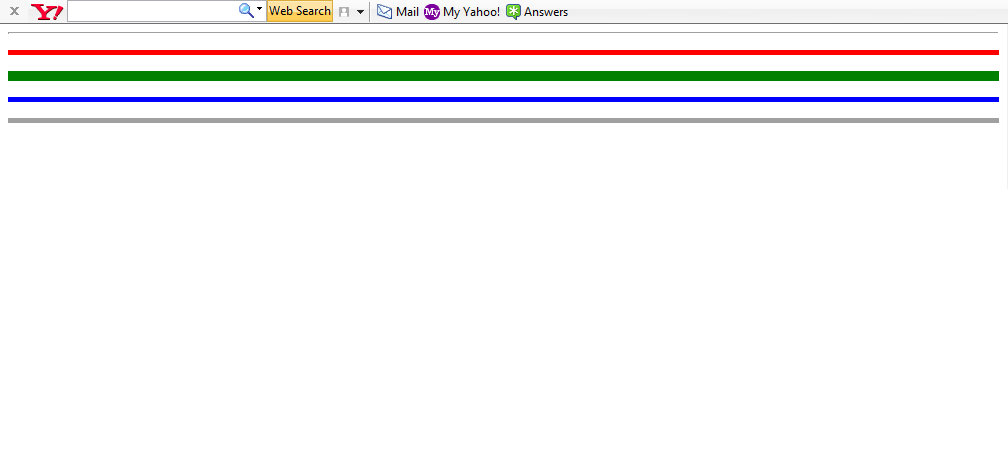
    The above output has 5 lines. The first one is a thin line, because there is no size tag.

    <html>
    <head>
    <title> Example 3</title>
    </head>
    <body>
    <hr > <p>
    <hr size=3 color=red> <p>
    <hr size=8 color=green></p>
    <hr size=3 align=right color=blue><p>
    <hr size=3 noshade ></p>
    </body>
    </html>
    2.
    <html>
    <head>
    <title> Example 4</title>
    </head>
    <body>
    <font size=1 color=crimson>
    We the Cottonians <br></font>
    <font size=2 color=blue>
    We are all here<br></font>
    <font size=3 color=gold>
    We want to do YES <br></font>
    <font size=5 color=green>
    Always our best<br></font>
    <font size=4 color=purple>
    Our motto is <br></font>
    <font size=5 color=olive>
    NEC DEXTRORSUM NEC SINSITRORSUM<p>
    <font size=6 color=crimson>
    Hip Hip Hurrah.......
    </body>
    </html>